Showing posts with label 21clhk9. Show all posts

Sunday, March 12, 2017

Change Management and The Culture of Innovation


This workshop was similar to the previous one that I (Taylor) wrote about in regards to chage.  I think change is something we have to be constantly thinking about because it is always happening.  Dr. Marie Alcock spoke in the initial keynote about how there are generation gaps between our 12th, 5th and kindergarten aged students.  Because of these new generation gaps, we can no longer teach “the way it has always been done”

Craig Kemp is the Head of EdTech at a school in Singapore and took us through his thinking and process of change, as well as introducing us to others that had experience.

The first thing to consider--Where do you sit on the 3 carriage train?


In thinking about the video it really offers perspective on who we as Tech coaches (but you can consider your students as well) should be investing in to spark change and innovation.  

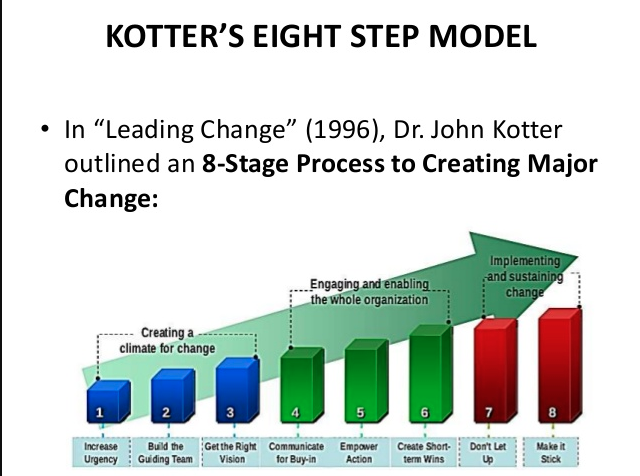
John Kotter shared with us via skype about his experience in change and was very specific by understanding the 3 P’s of Leading Change:

Know your Product--
Before change can be brought into the classroom, school or district, it is so important to do your homework. What works? What doesn’t work? How did this alter the learning culture within other schools who have made the change? How will we test the product? How will parents be involved in the change?

Know your People--
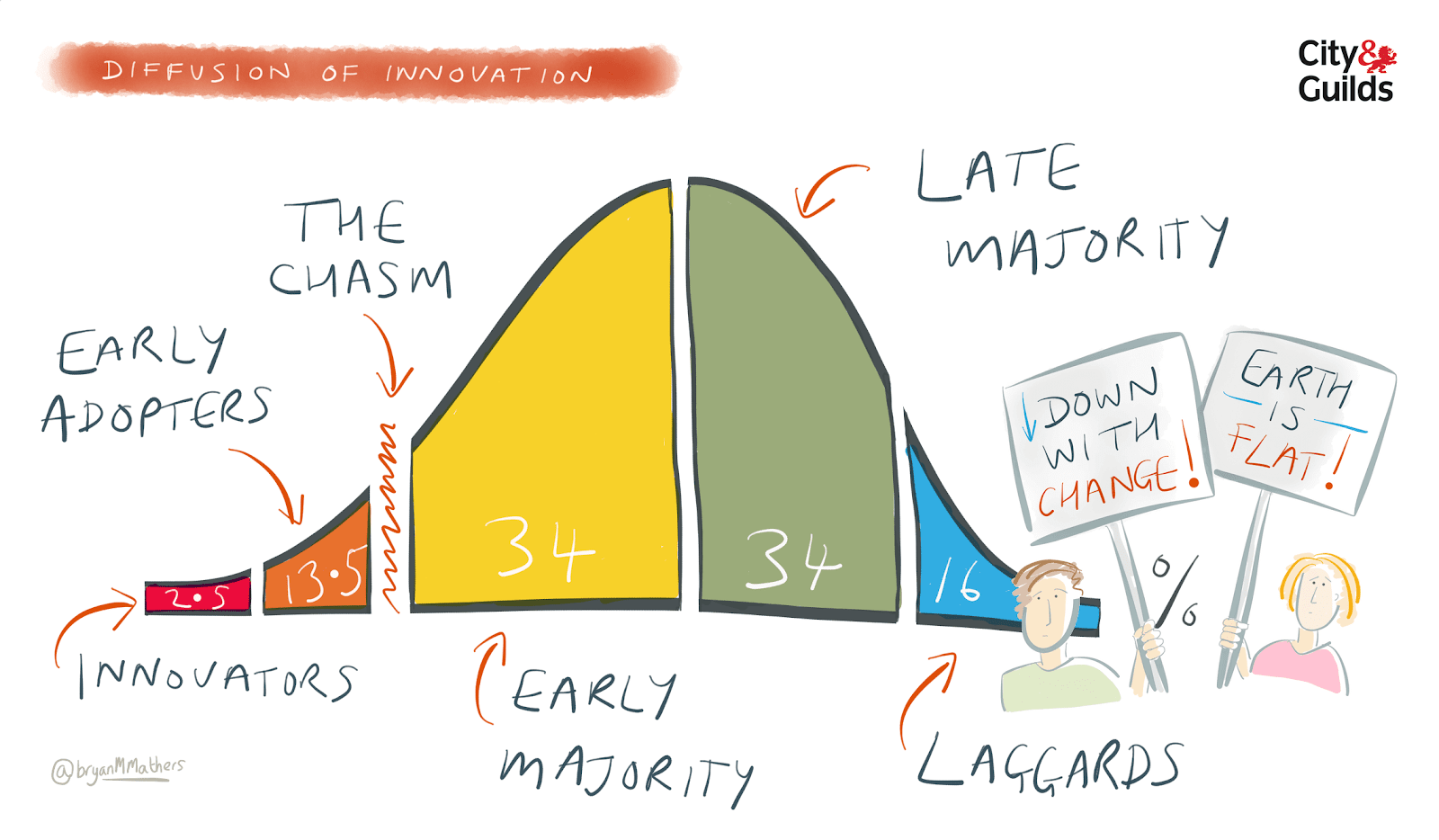
Bring innovators/early adopters to help plan and test.
Develop a specific, simplified introduction plan for the late majority that eliminates risk
Show the Laggards how change simplifies things, helping to bring some understanding to the table.

Know your Process--
What is the ultimate goal?  What are the steps we need to take to introduce this change in a professional, economic and mindful way?


The last part of the workshop that was really important was the idea that
TEACHERS NEED TO BE CONNECTED TO SHARE, LEARN and GROW!

Consider this video:


Who’s the crazy nut and where are all the first followers at?  

Get connected!  Dance!  Innovate!  

Saturday, March 11, 2017

Creating Change when Change is Hard


Creating Change When Change is Hard
Change is Hard.  If we think about our classrooms and trying to bring different ideas into the classroom it can be hard.  Hard because it means you might fail.  Hard because you might not have the admin support (thankfully we have great support).  Hard because it might mean a little more energy and a little less content on the schedule.

In this session we were able to explore the process of change, reflecting on best practices in bringing change, introducing innovation and providing a path to go down.

There was a great deal of information that came from this workshop, but I wanted to share some summaries.

The speaker's name is Andrew McCarthy and his resources from this workshop is here: http://bit.ly/21Change

In order to understand how change is hard, we needed to experience some moments when change didn’t work.  The speaker shared about the LA County iPad roll-out scandal.  In theory it was a great idea--give every student in LA County an iPad to learn with.  In practice, the project failed.  You can read more about it here.


Big Idea #1: Find the Bright Spots
The initial question of this part was “why do we focus so much on a failing grade on a report card and not what is working within the class the student gets an A?”

Basically, we need to be using our time and energy to focus on the bright spots, research them and then replicate them in the dark areas of our school.  For example, teachers who are successfully enhancing student’s learning with the integration of technology could be considered bright spots.  From a tech coach’s perspective it would make sense to continue working with the teachers that are not at the same level as the “techie” teachers.  However, if energy is focused on the why and how of the techie teachers and then replicated with those who are not so techie, change could move in a forward direction easier than without.

Big Idea #2:  Script the Critical Moves
When bringing change into the classroom, change must be specific.  Exactly like teachers delivering objectives for each lesson, change needs to have specific objectives of why? How? When? And who?  (Thing SMART objectives but for teachers).  From a tech coach’s perspective this could be specific practices of technology integration into the classroom.  One example was, “ Use Google Docs to feedback and Comment on student work and encourage revision”.  Specific. Simple. Focused.  Easy for all teachers to read and apply this objective.

Big Idea #3:  Point to a Destination

“Let me show you the future”

“Let me show you what your classroom could look like with _______”

Define your destination.  

UWCSEA Learning principals--Defining the goals of learning within the school https://www.uwcsea.edu.sg/about/guiding-statements/uwcsea-learning-profile

NESTA Decoding learning: The proof promise and potential


Big Idea #4:   Grow your Teachers
Where do you spend your time with people and change?
Teachers who are growing and learning or teachers who are laggards, not moving forward, not willing to grow.

diffusion-of-innovation-2.png

Big Idea #5: Shaping the Path

Remove the barriers for teachers
Be specific and focus training on specific tools and strategies
(lms, google classroom, schoology, seesaw etc)

Build the Habits and document them-- Remind teachers the best things that they had done within a grade level or department of how things were doing

Tech Coach Job Alike Report


The Job Alike was a really great experience.  I think anytime we can connect and network with educators that share similar passions and responsibilities, the ideas flourish.  My biggest take away was that we are on the right track.  That the work that we are slowing introducing within the ES and SS in using Technology Coaches is good.  We are at the infant stages and next year there will be more opportunities for teachers and coaches to grow and connect.  One challenge that I hope to implement in the future is

Teachers need to SAMR-ize a unit”


Thinking about the SAMR model, this is a practical challenge where teachers can think of innovative ways to deepen and enhance learning in their classrooms. What this does is it creates opportunities for tech coaches to be in the classrooms and motivates teachers to innovate what they are doing with their students.  A Win Win!

The Next Great piece was the DEMO SLAM!  Here’s all the toys and fun we can add to the classroom!


Coding and Maker Competition-- www.apcmclearning.com


Students from HKIS and other schools were interning with 21CLHK.  As a part of their internship they are building a conference for students around Making and Coding!

Love Gifs?  Want to make Gifs?  Use GifBrewery!
giphy.gif

WriteAbout.com
https://www.writeabout.com/

This is a writing specific website that allows students to be prompted by images or quotes. Then, students submit their writing to teachers, get feedback, make changes and complete the assignment within the same website.  The COOLEST part is that then students get to choose if and when they share their writing publicly.  Either within the classroom or within the greater WriteAbout online community.  This gives students the opportunity to launch their writing publically and have more than one audience!


CoSpaces!

This is the app that I am the most excited about (and teachers will be seeing training sessions on soon!)  Students are able to create and present their own virtual reality space.  They can bring their learning to life, and integrate it into the Virtual Reality Viewers.  SO COOL!

Pin Tab
Are you a person who always opens the same 3 tabs in the morning (Portal, email schoology).  If you click on the tab and Pin it, the browser will remember the tab and always open it when you start the browser or the computer.

Bloxels
Bloxels is a mix of hands on design and in app creation.  Students use physical blocks to build different levels and characters in their video games.  They are then able to scan each level into the ipad to develop the game.  This can introduce students to hands on game design, storytelling through games, and so much more!


Overall the Job Alike was a great time.  I have other ideas that are Tech Coach specific that you might experience soon, but for now, enjoy this!